Fix NinjaScript Errors with AI
The current generated code response includes Check NinjaScript Errors in its action bar. Existing Strategy and Existing Indicator also offer this button beside the attached current source, with the review button last on the right. This allows you to validate generated NinjaScript before importing the file into NinjaTrader and identify common compiler problems without manually searching through the source code. Xen sends the latest complete C# file to an isolated server-side compiler configured with installed NinjaTrader assemblies. Build Check is intended to catch ordinary C# compiler problems and selected NinjaScript lifecycle mistakes before you move the file into NinjaTrader. The generated assembly is never executed.

How to Repair Errors
Watch this short demonstration to see Xen create a NinjaTrader Strategy, detect a NinjaScript build error, switch AI models for debugging and repair the code before deployment. The example uses a lower-cost model to generate a SuperTrend Strategy. Build Check then identifies a problem in the generated source, after which another AI model is selected to investigate and repair the existing project.
Tip: Set the video quality to HD (1080p) for the clearest view of the source code and Build Check results.
Understanding a Passed Check
A passed result means the server compiler found no supported build errors. It does not prove that NinjaTrader will load the script, that OnStateChange will complete successfully or that the trading behaviour is correct.
Build Check should therefore be treated as an additional development safeguard rather than a replacement for compiling and testing inside NinjaTrader. A Strategy or Indicator can pass the server-side check and still encounter problems caused by local dependencies, runtime behaviour or differences in the NinjaTrader environment where it is ultimately used.
The report reminds you to complete the final compilation and testing in NinjaTrader.
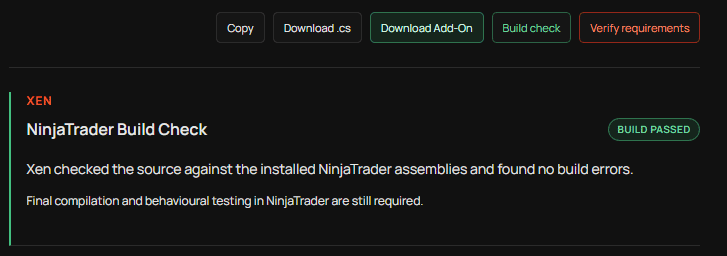
Build Check and backtest analysis are independent workflows. If you want Xen to review the performance of a Strategy, choose Analyse Backtest from the task panel and provide a Strategy Analyzer Summary CSV.
Understanding Build Errors
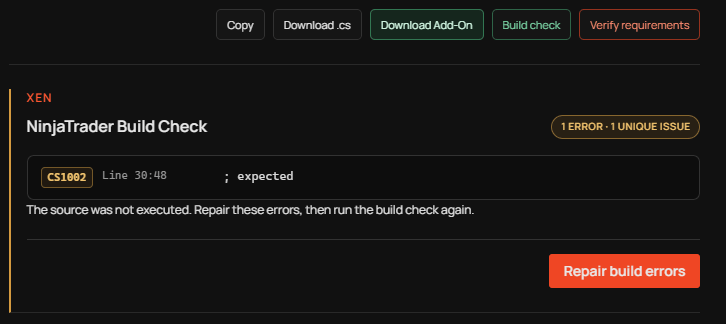
When compilation fails, Xen shows a visible, scrollable diagnostic list and places an amber Fix errors button immediately after Check NinjaScript Errors. Compiler setup, timeout, restore and other infrastructure failures require a retry or configuration correction and do not offer automatic source repair. Xen groups repeated diagnostics into unique issues and highlights the relevant source locations. This reduces noise when the same underlying problem produces several compiler messages and makes it easier to understand what needs to be repaired. The Build Check badge reports both the total number of compiler errors and the number of unique issues. This helps distinguish between several independent problems and one underlying mistake that has generated repeated diagnostics.
Repair NinjaScript with AI
When Build Check detects a problem, select Fix errors to prepare a focused AI request containing the latest complete source code together with the compiler diagnostics. The repair runs through the normal Xen AI workflow and consumes credit. The selected AI model analyses the existing project and attempts to correct the identified problems without rebuilding the Strategy or Indicator from the beginning.
When the model returns a complete revised C# file, Xen automatically runs Build Check again on the repaired source. If the response does not contain a complete file, the workspace explains that an automatic check could not be performed.
Once complete corrected source replaces the previous file, obsolete diagnostics and repair controls disappear. Any subsequent check uses the corrected source. You can also paste exact NinjaTrader compiler messages or describe a behaviour bug directly in the selected code task; keep the source and reproduction details with that request. Repairs preserve unrelated working logic and return complete corrected files.
This creates a straightforward development cycle:
Build → Check → Repair → Check
Choosing an AI Model
You are not restricted to the AI model that originally created the project. Xen allows the selected model to be changed as the development task changes. A lower-cost model may be suitable for the initial generation of a straightforward Strategy or Indicator, while a different model may be selected when the project requires more difficult debugging or code repair. The existing source and project context remain available when the model is changed.
This allows the model to be selected according to the current task rather than using the same model for every stage of development. Repairs keep your selected model and remain in the same task, conversation and project. Only the latest Build Check result is kept as the active diagnostic card. Repeated checks do not fill a restored project with obsolete pass and failure reports, while the repair request and revised-code conversation remain saved in the project history.
Final Compilation
Always compile the final source in the same NinjaTrader installation where it will be used. Local Add-Ons, custom Indicators, additional assemblies and differences between NinjaTrader versions can create dependencies that are not present on the Xen server. After importing or installing the completed project, compile it inside NinjaTrader and review the NinjaTrader Log. The Strategy or Indicator should then be tested to confirm that its actual behaviour matches the original requirements.
A successful Build Check confirms that the server compiler found no supported build errors. It does not confirm that the trading logic is correct, that the Strategy is profitable or that the project is suitable for live trading.
Runtime Errors
Runtime errors are different from compiler errors. A Strategy or Indicator can build successfully and still encounter a problem when it is loaded or running inside NinjaTrader. If this happens, use Existing Strategy or Existing Indicator and provide Xen with the complete current source together with the exact NinjaTrader Log message. The Log information gives the AI the context required to investigate what happened in the local NinjaTrader environment.
Requirements Verification
A successful build does not confirm that every requested feature has been implemented correctly. Use Requirements Verification when you want Xen to compare the latest complete NinjaScript source with the original request or active Build Plan. This can identify requirements that are missing, only partially implemented or need further review. Build Check and Requirements Verification answer two separate questions: whether the code builds correctly and whether the code implements what was requested.
Both should be considered before treating an AI-generated NinjaTrader project as complete.