Converting Indicators to NinjaTrader
Select Convert Indicator when you have the complete source code for an indicator from TradingView, MetaTrader or another trading platform and want to recreate it as a NinjaTrader 8 Indicator. The conversion should preserve the original calculations, configurable inputs and visual output as closely as NinjaTrader allows. Upload a supported text file or paste the complete source into the composer. Xen cannot reconstruct exact formulas, private dependencies or hidden logic from an indicator name or screenshot alone.
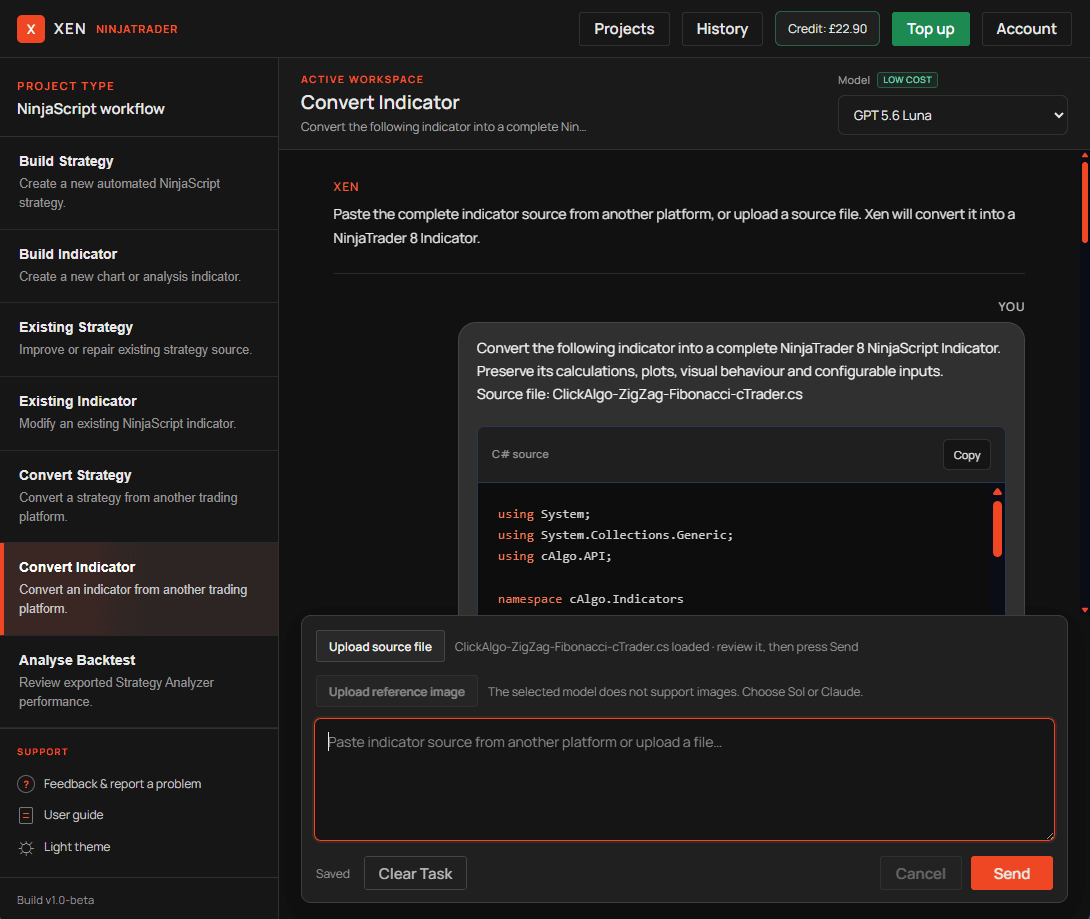
How to convert an indicator
Open Xen and select Convert Indicator from the task menu. Paste the complete indicator source into the composer or use Upload source file to attach a supported text file. Tell Xen which platform the source was written for and confirm that the required output is a NinjaTrader 8 NinjaScript Indicator.
Include any important visual requirements that may not be obvious from the code. If you have a chart screenshot, attach it as a visual reference for plot colours, line styles, markers and panel placement. Submit the request, review Xen's conversion notes and run Check NinjaScript Errors on the generated NinjaScript before downloading or copying it into NinjaTrader.
How indicator conversion works
Indicator platforms use different calculation models, data series and chart APIs. TradingView plots and Pine Script series must become NinjaScript plots, custom series or drawing objects. MetaTrader indicator buffers must also be mapped to the closest NinjaTrader equivalent. Xen preserves the original intent where the NinjaTrader API provides a suitable equivalent. The response explains important mappings and identifies behaviour that cannot be reproduced exactly. Review these notes before testing the result.
Source code and dependencies
Provide the complete original indicator source, including its inputs and calculation logic. If it imports custom libraries or calls other indicators, include those dependencies or describe the required behaviour. Xen does not invent a replacement for an unavailable component when that would materially alter the indicator.
A screenshot can accompany the conversion when a supported model is selected. It helps communicate colours, line styles, panel placement and markers, but the source code remains authoritative for calculations. Only convert code that you own or have permission to modify. An explicit restriction on modification, redistribution or reverse engineering must be respected.
Test the converted indicator
Run Check NinjaScript Errors, compile the complete file in NinjaTrader and apply it to a chart. Compare its values, signals and plots with the original indicator using equivalent market data, settings, instruments and timeframes. Check historical bars and real-time updates, including any behaviour that depends on bar-close or intrabar calculation. Resolve differences before adding unrelated features. If you need to convert automated trade execution rather than chart calculations, use Converting Strategies.
Convert a TradingView Pine Script Indicator
Watch this video to see Xen convert a TradingView Pine Script indicator into a NinjaTrader 8 NinjaScript Indicator.
Tip: Set the video quality to HD (1080p) for the best viewing experience.