Choosing an AI Model
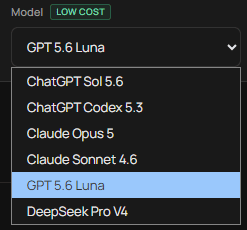
NinjaTrader Xen provides access to flagship AI models from major AI companies through a single workspace. The available models are reviewed and updated regularly as AI coding technology improves. The selected model is used for your next request and remembered when you return. The most advanced model is not always the best choice for every task. Coding ability, reasoning, speed, cost and image support can all influence the result.
What Is the Best AI Model for NinjaScript Coding
Watch this two-minute video to see how Xen uses flag-ship models to build your NinjaTrader tools.
Tip: Set the video quality to HD (1080p) for the best viewing experience.
Choosing a Model
Use a capable coding model for complex indicators, strategies, conversions and large NinjaScript projects. For compiler errors or targeted changes to existing code, choose a model with strong code-repair capabilities. Lower-cost models can be suitable for simpler projects, explanations and routine modifications.
Some models support reference images. These can be useful when creating indicators, dashboards or chart interfaces from a screenshot or design example. For Strategy Analyzer reports, choose a model with strong reasoning capabilities. It should compare several performance metrics instead of focusing only on net profit. The analysis prompt remains the same regardless of the supported model selected. Model performance can vary depending on the complexity of the request. If a result is incomplete or inaccurate, try improving the instructions or switching to another model.
Model Availability
The available models may change as providers release improved versions or discontinue older ones. NinjaTrader Xen regularly reviews its selection and replaces models when a newer option provides better quality, speed or value. Some specialised workflows may use or recommend a proven model for a particular task. For example, Xen may offer a dedicated repair retry after repeated failures.
Reference-image controls are disabled when the selected model does not support image input. Xen displays this restriction before the request is sent so that an attached image is not accidentally ignored.
Credit Use
Models charge different amounts for input and output tokens. Large source files, long conversations and extensive generated code consume more credit than concise requests. Lower-cost options are identified in the model selector. Exact charges are based on actual usage rather than a fixed fee for each message. Start with a model suited to the complexity of the task. Switching models can help when a provider is slow, a complex build is incomplete or repeated repair attempts have not resolved the problem.