Requirements Verification
Verify requirements audits the latest complete generated source against the behaviour explicitly requested in the project conversation. It is useful after a new build, a staged Build Plan or several rounds of modification. The verification model does not rewrite the code. It creates a requirement checklist, identifies the relevant class, property or method, and separates implementation evidence from work that still requires NinjaTrader testing.
Watch a Quick Demo using Xen AI
Watch this video to see how Xen AI verifies generated NinjaScript against your original requirements and identifies missing, partial or manually testable behaviour.
Tip: Set the video quality to HD (1080p) for the best viewing experience.
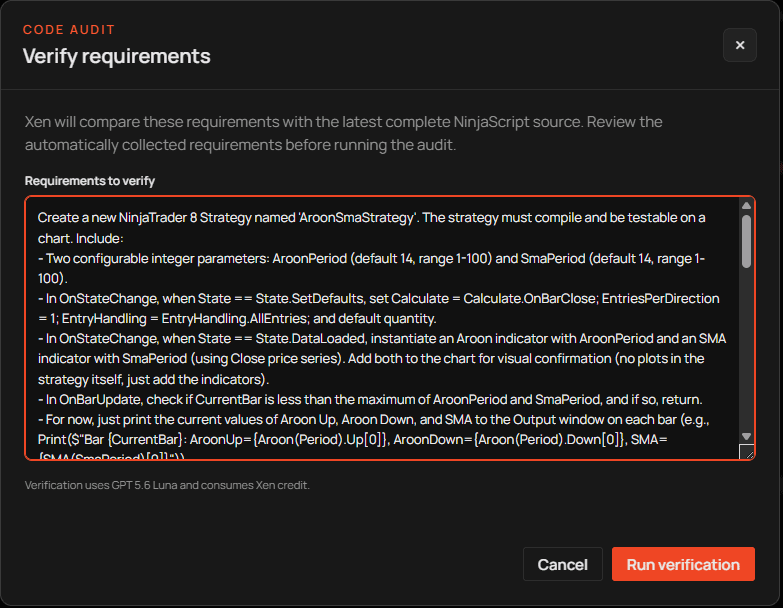
Reading the report
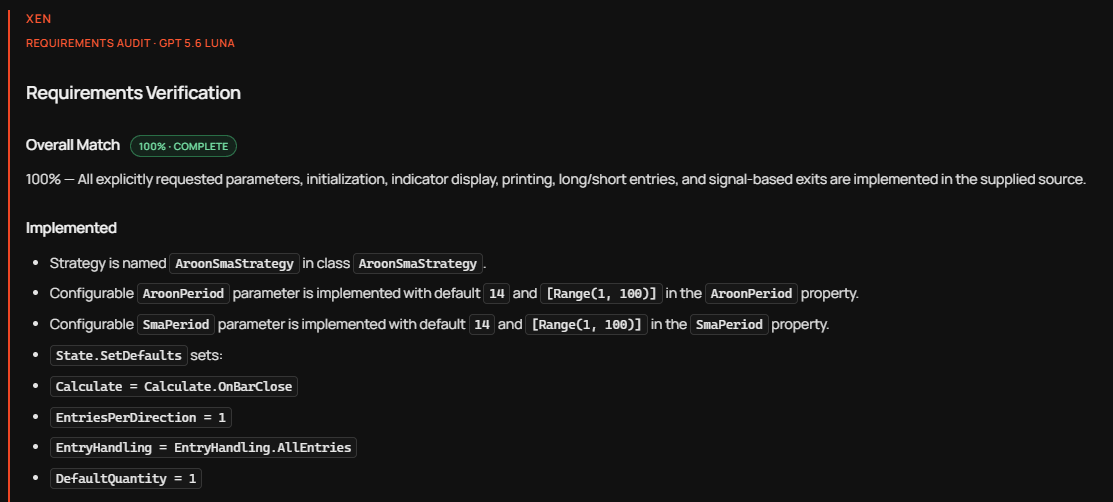
The Overall Match badge uses green for complete implementation, amber when review or repair is required, and red when material requirements are absent. The percentage is calculated from explicit requirements rather than optional enhancements.
Implemented items cite the relevant source. Partially Implemented and Not Implemented sections explain the gap, while Manual Test Required identifies behaviour that static code analysis cannot prove. Risks identify lifecycle, order-management, calculation or repainting concerns without treating every concern as a missing requirement.
Repairing a gap
When the report finds an explicit requirement that is missing or partial, Fix requirements prepares and submits a repair using the exact audit. The original request remains part of the context.
Run verification again after the repaired source is returned. If the percentage remains unchanged, inspect the cited requirement and source rather than repeating repair indefinitely. The requirement may need clarification, or the requested behaviour may require a manual NinjaTrader test instead of another code change.
Requirements Verification does not replace Build Check. Requirements Verification examines whether the requested behaviour is represented in the source, while Build Check verifies that the source compiles against the server's NinjaTrader references. Both should be followed by compilation and behavioural testing in NinjaTrader.