Workspace and Tasks
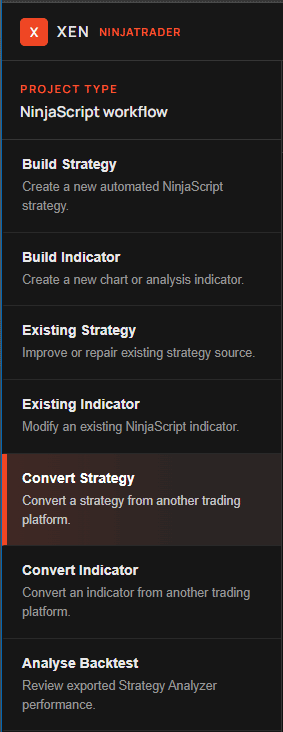
The Xen workspace keeps the development process on one screen. Tasks are selected from the left panel, the active project and model appear across the top, the conversation occupies the centre, and the request composer stays at the bottom.
The task selection is more than a label. It changes the system instructions, accepted uploads, opening guidance and the type of NinjaScript Xen is expected to return. Select a different task when the kind of work changes; do not ask an Indicator task to create a Strategy or use a conversion task without supplying source code. If the current workspace contains a project, an attachment or an active Build Plan, Xen asks for confirmation before switching tasks because the current task workspace will be closed. Saved projects and snapshots remain available.
Build tasks
Build Strategy creates a new NinjaTrader 8 Strategy from a description of its entry, exit, position-management and risk behaviour. Build Indicator creates a chart or analysis Indicator from calculation and visual requirements. These tasks are suitable when no source file exists. A concise request is often enough for a standard indicator or simple strategy, while a more complex system benefits from the Prompt Builder and a staged Build Plan.
Existing-code tasks
Existing Strategy and Existing Indicator are used when you already have NinjaScript source. Upload or paste the complete file and describe the exact change. Xen is instructed to preserve the class name, public properties and unrelated working behaviour rather than rewriting the project without reason. Use these tasks for targeted enhancements, runtime problems, logic corrections and code review. If you only supply source without stating the required change, Xen will identify the script and ask what you want changed.
Conversion tasks
Convert Strategy and Convert Indicator translate complete source from another platform into NinjaTrader 8 NinjaScript. The source can be pasted or uploaded as a text-based file. Xen maps the original logic where NinjaTrader has an equivalent and explains any material platform difference. A screenshot can support an Indicator conversion by showing plots, colours and chart placement, but it cannot reveal the original formula. Complete source remains necessary for an honest conversion.
Analyse Backtest
Analyse Backtest is an independent task that reviews an exported Strategy Analyzer Summary CSV from any strategy. A Trades CSV can be included when deeper trade-distribution evidence is available. Xen evaluates the reported performance, long and short behaviour, risk-adjusted results and test assumptions without presenting historical performance as a guarantee. The task does not require a successful Build Check, an existing Xen project or the strategy source. Select it directly from the task panel.
Workspace controls
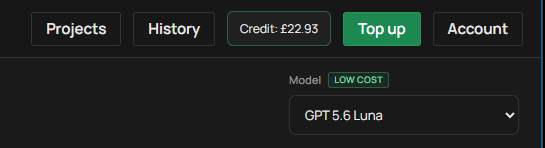
Clear Task starts a clean project. Projects opens saved conversations, while History displays saved source revisions for the active project. The credit indicator shows the current usable balance and changes colour when credit is low or exhausted. Light theme and Dark theme in the support area switch the workspace appearance; Xen starts in dark mode and remembers the selected theme.
The model selector changes the AI used for the next request and remembers the selection. Some models support indicator reference images and some do not; Xen explains the restriction beside the upload control.
The request composer
The composer accepts a written request and displays task-specific upload controls when required. Send starts the request, Cancel stops an active generation, and Clear removes text or an attachment that has not been sent. Xen waits for the full model response before formatting the result, preventing incomplete Markdown and partial code from being presented as finished output. A working indicator remains visible while the provider is responding.
Questions and coding requests
Xen distinguishes an ordinary NinjaTrader question from a request to build, modify or convert code. Coding requests can use relevant NinjaTrader examples from Xen's knowledge base. Questions bypass code-example retrieval so unrelated source does not contaminate an explanation, and ordinary questions are not retained as durable project requirements. Ask follow-up questions in the same project when they relate to the current work, but use Clear Task before beginning an unrelated script. When you return to coding, provide an actionable change so Xen can apply the correct task prompt and project source.