Workspace and Tasks
The Xen workspace keeps the Pine development process on one screen. Tasks appear in the left panel, the active project and selected model appear across the top, the conversation occupies the centre, and the request composer remains available at the bottom.
Task selection changes more than the heading. It controls the instructions used for generation, the files that can be attached and whether Xen expects a strategy, indicator, conversion or trade report. If the current workspace contains a project, source attachment or active Build Plan, Xen asks for confirmation before switching because the open task will be closed. Saved projects and snapshots remain available.
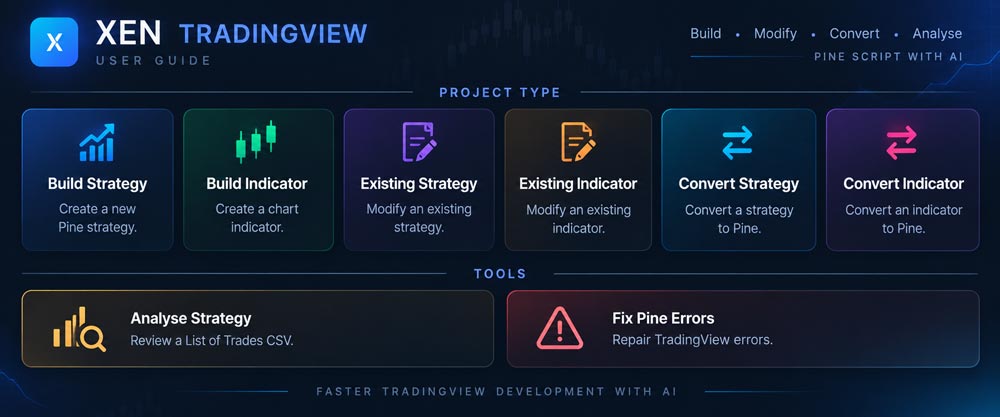
Build tasks
Build Strategy creates a new Pine Script strategy from entry, exit, risk and position-management requirements. Build Indicator creates a chart indicator from calculation and presentation requirements. No source file is required. A concise request often works for a standard indicator or simple strategy, while a larger system benefits from clarification and a staged Build Plan.
Existing-code tasks
Existing Strategy and Existing Indicator are used when a complete Pine Script file already exists. Add the current .pine source, then describe the change or ask for a review. Xen keeps that file as the authoritative codebase and can also retain a small number of integration or reference files. These tasks are suitable for focused enhancements, behavioural problems and code review.
Conversion tasks
Convert Strategy and Convert Indicator translate source from another platform into Pine Script v6. Supply the complete original source as .txt, .cs, .mq4 or .mq5. Conversion deliberately does not accept .pine because Pine source should be handled through an Existing task instead. Xen preserves the original intent where TradingView provides an equivalent and explains material differences in order handling, data series, timeframes and chart output.
Analysis and repairs
Analyse Strategy reviews one TradingView Strategy Tester List of Trades CSV. It calculates deterministic statistics from completed trades and uses GPT 5.6 Luna to explain the evidence. The task does not inspect or modify strategy source.
For repairs, stay in the code task you already selected. Use Check Pine Errors on the current source, then paste exact Pine Editor diagnostics or describe a behaviour bug in the conversation. Fix Pine errors prepares a repair of the current source while preserving the project, requirements and selected model. Xen returns a complete corrected script; compile it in TradingView and test its behaviour.
Workspace controls
Clear Task starts a clean project. Projects opens saved work and History displays complete generated source revisions for the active project. The balance indicator shows available credit, while the model selector controls the AI used for the next supported request. Theme controls switch between light and dark appearance and remember the selection.
The request composer
The composer accepts written instructions and displays the upload controls required by the active task. Send starts generation, Cancel stops an active response, and Clear Task removes the active project after confirmation. Xen waits for a complete response before presenting formatted code so that an interrupted fragment is not mistaken for a finished Pine file.
Xen distinguishes ordinary TradingView questions from requests to build or modify code. Coding requests can retrieve relevant Pine examples, while questions avoid injecting unrelated source. Continue in the same project for connected refinements and start a clean task before beginning an unrelated script.