How to Use cBot Analysis in Xen
This guide explains how to use the cBot Analysis feature in Xen to evaluate and improve your trading strategy using real backtest data. Once you have built and tested your cBot in cTrader, Xen can analyse the results and give you clear, practical feedback on how the strategy is actually performing and where it can be improved.
What cBot Analysis Does
Xen takes your cBot code together with the backtest report and evaluates how the strategy behaves in real conditions. It looks at performance, trade behaviour, and risk, then turns that data into a structured analysis.
The result is a clear report that highlights what is working, what is not, and what to change next. Instead of guessing or tweaking blindly, you are working from actual data.
Video Guide
Tip: Set the video quality to HD (1080p) in the player settings for the best viewing experience.
Example Backtest Report
When you upload a report into Xen, it contains detailed information about how your strategy performed over time. This includes profit, drawdown, trade behaviour, and the parameters used.
A typical report structure looks like this: cBot Report
Note
Xen reads and interprets this data automatically, so there is no manual setup required.
Before You Start
Before using the analysis feature, make sure your cBot has been properly tested. It should compile without errors and behave as expected during a backtest. You also need a complete backtest report saved from cTrader. Partial or low-quality reports will limit the usefulness of the analysis.
Warning
Do not upload incomplete reports. Xen relies on full data to produce accurate results.
Downloading the Backtest Report (report.html)
After your backtest has finished in cTrader, you need to download the report file that Xen will analyse.
In the Backtesting results screen, look to the top right corner. There is a small export/download icon. Clicking this will generate the full report as an HTML file.
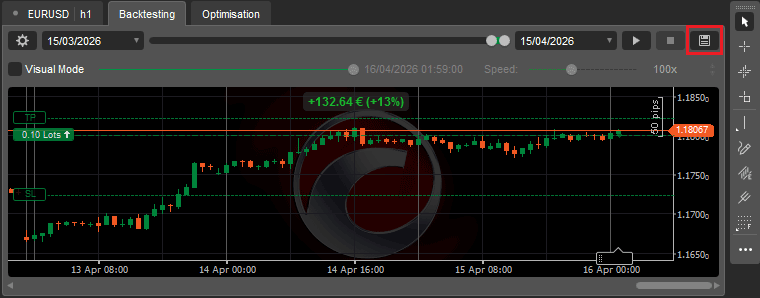
When you click the icon:
- The report is saved as report.html
- It contains all performance data, trades, and statistics
- This is the file Xen requires for analysis
Save the file somewhere easy to access, such as your Documents folder, then upload it into Xen using the Analysis button.
Note
Do not rename or modify the file contents. Xen expects the original report format generated by cTrader.
When the Analysis Button Appears
The Analysis button is only shown once Xen has everything it needs.
This happens after you have successfully built your cBot and run a backtest in cTrader. At that point, Xen has both the strategy logic and the performance data required to carry out a proper evaluation.
Running the Analysis
The process is straightforward.
First, build your cBot in Xen. Then run a backtest in cTrader and export the report. Once you return to Xen, click the Analysis button, upload the report file, and submit it. Xen will then process the data and generate a full analysis report.
What Xen Looks At
Xen does not just look at profit. It evaluates how the strategy behaves as a whole. It examines performance metrics such as profit and consistency, but also focuses on risk, including drawdown and losing streaks. It looks at how trades are executed, when they occur, and how the parameters influence outcomes.
This broader view is what allows Xen to identify issues that are not obvious from the headline numbers alone.
What You Get Back
The output is a structured report written in plain terms. It highlights weaknesses in the strategy, flags potential risk issues, and suggests specific improvements. In many cases, the recommendations focus on refining entries, adjusting stop loss and take profit levels, or improving the overall balance between risk and reward.
Recommended Workflow
The most effective way to use this feature is as part of an iterative process.
Build your cBot, run a backtest, analyse the results in Xen, then apply the suggested improvements. After that, rebuild and test again.
Repeating this cycle is how strategies gradually improve.
Success
Consistent testing and analysis will produce far more reliable strategies than one-off optimisation.
Common Mistakes
Most problems come from poor input data rather than the analysis itself. Very short backtests, too few trades, or unrealistic settings will lead to misleading conclusions. It is also common to ignore the feedback and continue testing without making meaningful changes.
Tips for Better Results
Use longer test periods where possible and aim for a reasonable number of trades so the data is statistically meaningful. Keep your spreads and commissions realistic, and avoid testing only in ideal conditions. The better the input data, the more useful the analysis will be.
Related Guide
Before running analysis, make sure your backtest is set up correctly:
Final Advice
Quote
Backtesting gives you the data.
Xen helps you understand what that data actually means.