How to Validate Requirements in Xen
This guide explains how to use Xen's Requirements Validation feature to compare requirements against generated cTrader code. Requirements Validation helps identify missing features, incomplete implementations, logic issues, and potential trading risks before you spend time backtesting or deploying a strategy.
Video Guide
Tip: Set the video quality to HD (1080p) for the best viewing experience.
What Requirements Validation Does
When building a cBot or indicator, it is easy to assume that a feature has been implemented correctly when it has actually been omitted, simplified, or only partially completed. Requirements Validation allows Xen to compare a set of requirements against the latest generated code and determine how closely the implementation matches the intended behaviour.
The resulting report highlights implemented functionality, partially completed features, missing requirements, and potential risks. This provides an additional layer of review before you begin testing or optimisation.
When Should You Use It?
Requirements Validation is useful whenever you want to confirm that the generated code matches a specification, feature request, revision note, or desired behaviour. Many users run validation after making several changes to a project, particularly when requirements have evolved over time. It is also useful when reviewing customer requests, bug fixes, or enhancements that have been added during development.
Tip
Requirements Validation is most effective when the requirements clearly describe how the cBot or indicator should behave.
Before You Start
Before running validation, make sure the code has been generated successfully and builds without errors. The recommended approach is to generate the code, review the output, and run Verify Build first. Validation should always be performed against the latest working version of the code.
Warning
Requirements Validation does not replace compilation or runtime testing. The code should build successfully before validation is performed.
Opening Requirements Validation
After generating code and verifying the build, locate the Validate Requirements button in the Xen response panel.

Selecting the button opens the Requirements Validation window.
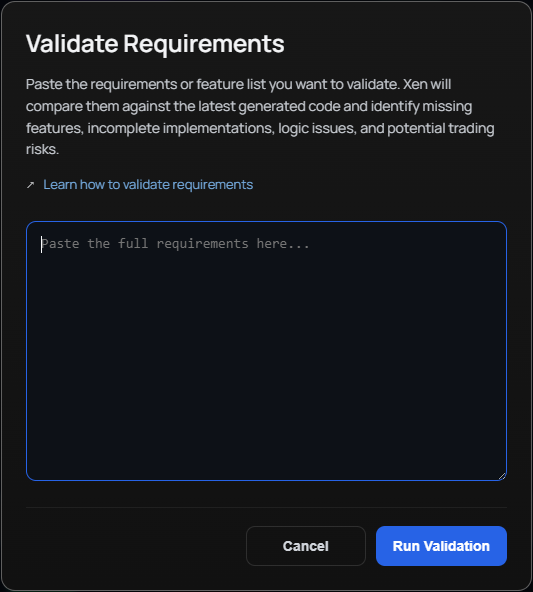
The window allows you to paste the requirements, specification, feature list, or revision notes that you want Xen to compare against the generated code.
What Should You Paste?
You can paste any description of the functionality that should exist within the code. This might be the original project specification, a list of new features, customer requirements, revision notes, bug fixes, or a combination of several changes that have accumulated during development.
The requirements do not need to be the original prompt that was used to generate the code.
Note
Xen validates against whatever requirements you provide, regardless of how the code was originally created.
Running Validation
Once your requirements have been entered, click Run Validation.
Xen will analyse the latest generated code and compare it against the requirements you supplied. The validation report is usually generated within a few seconds and is displayed directly inside the chat window.
Understanding the Validation Report
The report is divided into several sections that help identify gaps between the requirements and the implementation.
The Overall Match section provides an estimated percentage showing how closely the implementation matches the supplied requirements.
The Implemented section lists features that Xen can clearly identify in the code.
The Partial section highlights functionality that exists but may not fully satisfy the intended requirement. This often includes simplified logic, incomplete validation, or partially implemented trading rules.
The Missing section identifies requirements that Xen could not find in the implementation and are likely to require further development.
The Risks section highlights potential concerns such as trading logic weaknesses, platform-specific issues, repainting behaviour, parameter misuse, or risk management problems.
Finally, Recommended Next Steps provides practical suggestions for improving the implementation.
What Xen Can Detect
One of the biggest advantages of Requirements Validation is its ability to identify issues that are often missed during manual review. For example, Xen may detect that stop loss or take profit logic has not been implemented, that short trading functionality is missing, or that risk management rules have been simplified compared to the specification.
It can also identify missing alerts, incomplete entry conditions, omitted trading session filters, and other gaps that may not be immediately obvious when reviewing code manually.
Success
Catching these issues before backtesting can save significant development and testing time.
Recommended Workflow
Requirements Validation works best as part of a structured development process. Start by generating the code and confirming that it builds successfully. Once the build has been verified, run Requirements Validation to confirm that the implementation matches the intended behaviour.
After addressing any missing or incomplete functionality identified in the report, download the Algo file and continue with backtesting. Once a meaningful backtest has been completed, use Xen's Backtest Analysis feature to evaluate performance and identify potential improvements.
Following this workflow helps catch implementation issues before time is spent analysing results that may be based on incomplete functionality.
Generate Code
      ↓
Verify Build
      ↓
Validate Requirements
      ↓
Fix Missing Features
      ↓
Download Algo
      ↓
Backtest
      ↓
Analyse Backtest
Best Practices
The quality of the validation report depends heavily on the quality of the requirements provided. Try to describe entry conditions, exit conditions, risk management rules, alerts, notifications, and other important behaviour as clearly as possible. Specific requirements produce far more accurate results than vague requests such as "improve performance" or "make it better."
It is also good practice to run validation after major changes have been made to a project, especially when multiple revisions have been applied over time.
Limitations
Requirements Validation is designed to assist the review process, not replace it. While Xen can identify many implementation issues, it cannot guarantee that a strategy is profitable, free from bugs, or perfectly aligned with your intentions in every scenario.
The report should always be considered alongside manual review, testing, and backtesting.
Related Guides
You may also find this guide useful:
Final Advice
Quote
Requirements Validation helps answer one of the most important questions in software development: Does the code actually do what was requested? Always validate before investing time in optimisation, backtesting, or live testing.